
CrapFixer 是 Windows 上一款专为 Windows 10 和 Windows 11 系统设计的开源系统优化工具。它可以帮助用户清除广告、卸载预装软件以及强化隐私保护,让系统运行更加流畅,全方位保障隐私安全。
一键扫描检测:点击 “Analyze” 按钮,可快速扫描系统,能识别出预装臃肿应用,如 Microsoft Copilot、GetHelp 等,还可找出隐私风险项,如活动历史记录、位置追踪等,以及检测到影响系统性能的设置,如游戏 DVR、视觉特效等。扫描结果会以不同颜色标注,红色项表示需要立即修复的问题,灰色项为已优化的安全设置,绿色项是无需改动的正常配置。
系统优化修复:可隐藏任务栏搜索框和 Widgets,禁用开始菜单推荐内容和 Edge 浏览器同步广告。能关闭 Windows 遥测数据收集,包括诊断数据、应用使用记录等,还可禁用活动历史、位置追踪、剪贴板云同步,阻止系统自动发送用户反馈。此外,还可以关闭游戏 DVR、Xbox 后台服务等占用资源的功能,禁用电源节流和不必要的视觉特效,如透明毛玻璃,同时优化注册表项,提升文件系统响应速度。
系统垃圾清理:能够自动清理临时文件、系统更新缓存等系统垃圾文件,释放磁盘空间,提升系统运行速度。
操作可逆保护:点击 “Restore” 按钮,可秒速回滚所有设置。并且在注册表修改前会自动备份,对于不可逆操作,如永久删除预装应用,界面会明确标注,保障系统安全,避免因操作失误导致系统问题。
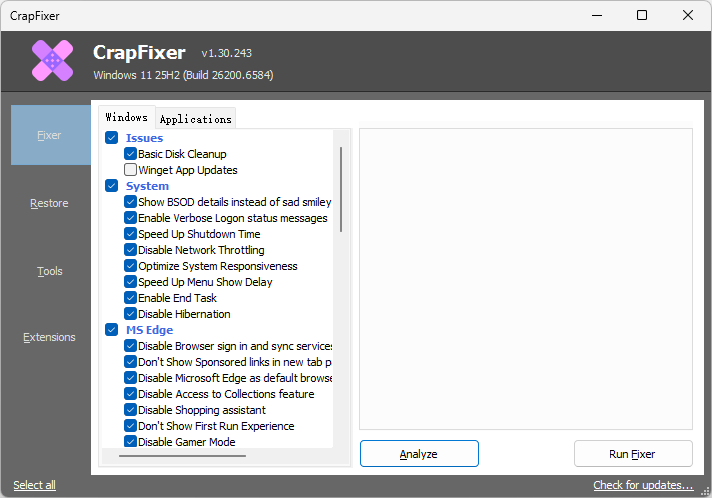
CrapFixer: Fixes Crappy Windows 10 and 11 Issues
CrapFixer is a utility designed specifically to address and resolve the various frustrating issues that can arise within Windows 10 and 11, effectively streamlining the user experience. As its name implies, it focuses on fixing the “crap” that often hinders performance and usability.
Familiar and User-Friendly UI
While it shares some similarities with CCleaner, particularly in its approach to system optimization and maintenance, the developer of CrapFixer acknowledges that the inspiration drawn from CCleaner serves as a foundation rather than a direct replication. This program aims to provide tailored solutions that enhance the smooth operation of the Windows operating system by eliminating unnecessary files, optimizing settings, and addressing common bottlenecks that can degrade performance over time.
CrapFixer features a user-friendly interface that harkens back to earlier versions of Windows, focusing on simplicity to enhance the user experience. This tool enables users to analyze and resolve system issues with minimal effort.
Lightweight, Secure and Powerful
CrapFixer is dedicated to enhancing the overall user experience while preserving its lightweight and secure design. The latest update introduces asynchronous processing, significantly improving performance by allowing multiple tasks to run simultaneously without slowing down the user interface. Additionally, the tool now features a comprehensive F1 help option for each tweak, providing users with instant access to guidance and support whenever needed, thereby making it even more user-friendly.
In a move to broaden its functionality, CrapFixer has also integrated support for external scripts. This feature enables users to extend the tool’s capabilities with custom scripts tailored to their specific needs, allowing for greater flexibility and personalization. To facilitate this, users can easily create a plugins folder adjacent to the executable file, where they can store and access these scripts. This enhancement not only empowers users to customize their experience but also encourages a community-driven approach, fostering collaboration and innovation within CrapFixer’s user base.
官方网站:builtbybel.github.io
运行平台:Windows10、11
界面语言:English
Download:CrapFixer.zip – 蓝奏云
发表回复