
制作精致、专业级的屏幕录制视频。
Recordly 是一款开源录屏与编辑工具,用于制作精致的演示、讲解、教程和产品视频。欢迎参与贡献。
Recordly 包含完整的光标动画与渲染管线、macOS 和 Windows 原生录屏系统、带动画的摄像头圆形叠加工作流、贴近 Screen Studio 的缩放动画、光标循环、音轨等更多核心功能。
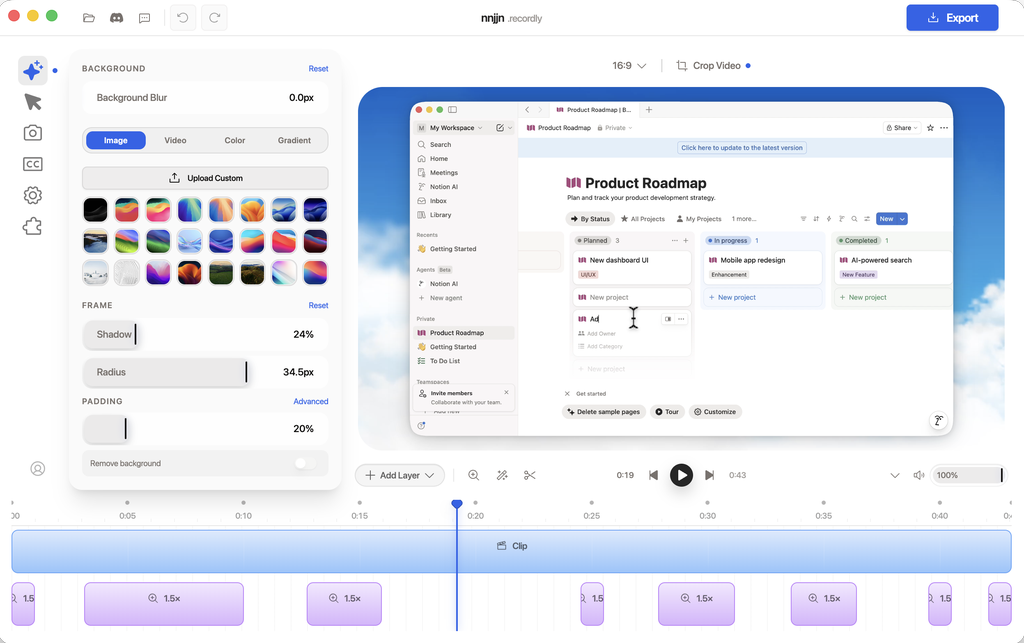
Make beautiful screen recordings
Recordly is your open-source tool for demos, walkthroughs, and product videos. Includes built-in auto-zooms, smooth cursor, and much more.
What is Recordly?
Recordly is a desktop app for recording and editing screen captures with motion-driven presentation tools built in. Instead of sending raw footage to a motion designer just to add zooms, cursor polish, or a styled background, Recordly handles that workflow in one place for free.
Recordly runs on:
- macOS 14.0+
- Windows 10 Build 19041+
- Linux on modern distros
Platform notes:
- macOS uses native ScreenCaptureKit-based capture helpers.
- Windows uses a native Windows Graphics Capture (WGC) helper on supported builds, with native WASAPI audio support.
- Linux records through Electron capture APIs. Cursor hiding is not supported on Linux today.
All Features
Recording
- Record an entire display or a single app window
- Jump directly from recording into the editor
- Capture microphone audio and system audio
- Use native capture backends where supported
- Resume editing from saved
.recordlyproject files - Open existing recordings or existing project files from the app
Timeline and Editing
- Drag-and-drop timeline editing
- Trim unwanted sections
- Add manual zoom regions
- Use automatic zoom suggestions based on cursor activity
- Add speed-up and slow-down regions
- Add text, image, and figure annotations
- Add extra audio regions on the timeline
- Crop the recorded frame
- Save and reopen projects with editor state preserved
Cursor Controls
- Show or hide the rendered cursor overlay
- Cursor size adjustment
- Cursor smoothing
- Cursor motion blur
- Cursor click bounce
- Cursor sway
- Cursor loop mode for cleaner looping exports
- macOS-style cursor assets for the rendered overlay
Webcam Overlay
- Enable or disable webcam overlay footage
- Upload, replace, or remove webcam footage
- Mirror webcam footage
- Size control
- Preset positions and custom X/Y placement
- Margin control
- Roundness control
- Shadow control
- Optional zoom-reactive webcam scaling
Frame Styling and Backgrounds
- Built-in wallpapers
- Runtime wallpaper discovery from the wallpapers directory
- Custom uploaded backgrounds
- Solid color backgrounds
- Gradient backgrounds
- Frame padding
- Rounded corners
- Background blur
- Drop shadows
- Aspect ratio presets for the final frame
Export
- MP4 export
- GIF export
- Export quality selection
- GIF frame-rate selection
- GIF loop toggle
- GIF size presets
- Aspect ratio and output dimension controls
- Reveal exported files in the system file manager
Workflow and Usability
- Customizable keyboard shortcuts
- In-app shortcut reference
- Feedback and issue links from the editor
- Project persistence for editor preferences
- Faster preview recovery after export
官方网站:https://recordly.dev/
运行平台:Mac/Windows/Linux
界面语言:多国语言
Download:Releases · webadderallorg/Recordly
发表回复