
一款功能完整的 PDF 编辑器,可查看、编辑、OCR、填写并签署…
全部来自单个约 14 MB 的原生 .exe,无需账户,也不会把任何数据发送到任何地方。
可安装或以便携方式运行。免费、开源、GPLv3。
无需账户或订阅。
不发送遥测,也没有广告…永远不会。
由一位对 Adobe 极度反感的现场技术人员打造。
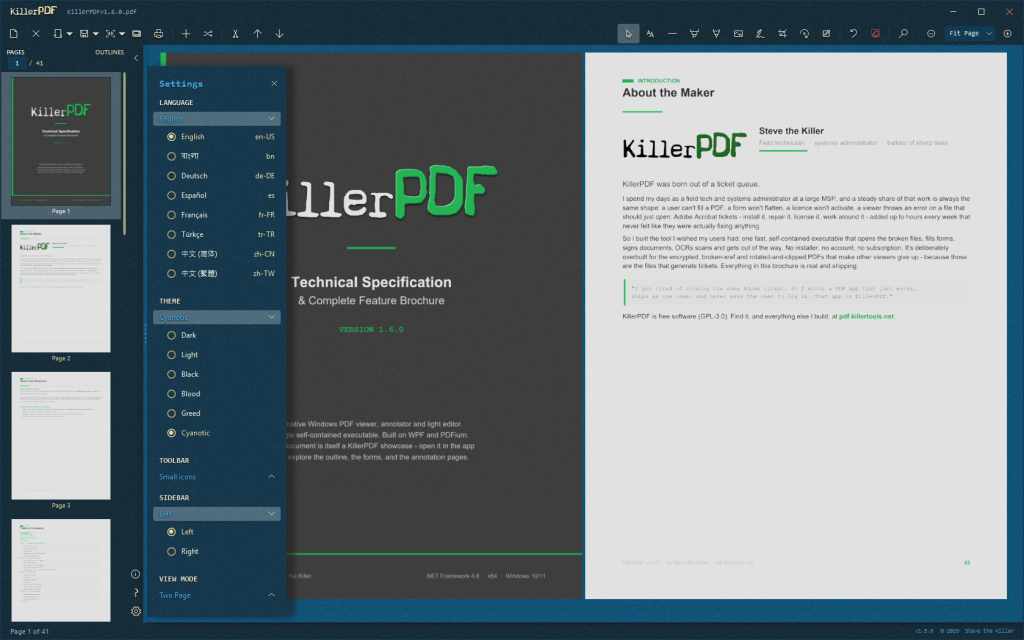
Free and open-source PDF editor for Windows. View, annotate, OCR, merge, split, edit text, draw, sign, fill forms, print, flatten, and open password-protected PDFs without an Adobe subscription or a phone-home. Install or run portable. Single Windows EXE, ~14.7 MB (ZIPs to 10.2MB), no runtime install required.
Why this exists
I hate Adobe. Acrobat is bloated, wants a subscription to do basic things, and phones home constantly. Most of the “free” alternatives are either ad-riddled, cloud-based, or rebrands of the same PDF engine sold under three different names.
KillerPDF is what I wanted: local-only, portable, no account, no telemetry. The PDF equivalent of Notepad.
Features
Viewing & navigation
- High-quality rendering via PDFium
- Four view modes – Single Page, Continuous scroll, Two-Page, and Grid – that persist across sessions
- Tabbed documents: open several PDFs at once, each restoring its page, zoom, and view mode
- Full-text search across the whole document with highlighting; drag-select to copy text
- Outline/bookmark navigation and clickable links, including internal cross-references and TOC back-links
- Zoom presets with scroll-wheel sync; Fit to Width and Fit Page re-apply on resize
- Full-screen mode (F11) hides all chrome so only the document fills the screen
- Recent files on the start screen and Open menu, each with its real Windows file-type icon
Annotate & edit
- Inline text editing with font matching against the original document
- Resizable, word-wrapping text boxes with an optional whiteout background fill
- Freehand draw, a straight-line tool, and highlight – each with its own color, opacity, and width
- Full RGB color picker: saturation/value square, hue strip, hex input, screen eyedropper, and editable palette
- Select tool to move, resize, multi-select, and restyle any annotation in place
- Insert images as resizable annotations, burned into the PDF on save
- Page-number and watermark stamping across a page range, applied as one undo
OCR (built in, no cloud)
- OCR a whole page or a dragged region straight to the clipboard
- Make Searchable PDF: lay an invisible text layer over a scan
- Extract All Text to a
.txtor.mdfile - Tesseract bundled in the single EXE; extra languages download on demand
Organize pages
- Merge multiple PDFs and split out selected pages, with drag-and-drop reordering
- Right-click sidebar: insert blank page, rotate, move, extract, or delete – on multi-page selections
- Crop with corner handles; remove crop from one page or all
- Transform: rotate by 90 degrees or a fine angle, scale, flip, and straighten a crooked scan by drawing a level line – live preview, with annotations following the transform
- Drop a folder or
.ziponto the window to merge the PDFs and images inside into one, or open each separately
Forms & signing
- Fill PDF forms (text, checkbox, radio) as live controls and save back to the PDF
- Digital signatures with a cloud certificate (Certum SimplySign), including click-to-sign form fields
- Draw and reuse signatures and initials, or import a PNG/JPG/BMP to place anywhere
Output
- Print with annotations flattened, a real in-app preview, and scale / position / margins / pages-per-sheet / color / two-sided options, rendered at 300 DPI
- Save Flattened PDF: rasterize every page into a fully uneditable document
- Document Info: view and edit title, author, subject, keywords, and creator metadata
Customize
- Six themes – Dark, Light, Black, Blood, Greed, Cyanotic – with per-theme accent colors, switchable live
- Toolbar style (icon size, text placement) and a resizable sidebar that docks left or right
- Localized UI in 9 languages (English, Spanish, Traditional and Simplified Chinese, German, French, Turkish, Bengali, Japanese); contribute via
Strings/TRANSLATING.md - Full keyboard shortcut overlay (Ctrl+?) with a link to the online guide
App & files
Local-only: no account, no telemetry, no phone-home
Single portable Windows EXE, ~14.7 MB, no runtime install
Self-installs per-user to %LOCALAPPDATA% (no UAC), registers as a PDF handler with a branded file icon, and uninstalls cleanly via Add/Remove Programs
Opens password-protected PDFs (prompts instead of erroring) and repairs damaged ones
官方网站:KillerPDF – Free, open-source PDF editor for Windows
运行平台:Windows 10/11 x64
界面语言:多国语言
Download:https://github.com/SteveTheKiller/KillerPDF/releases/latest/download/KillerPDF.exe
发表回复